
Nội dung chính
- 1 Giới thiệu tổng quan về Deployment & CI/CD trong Python
- 2 CI/CD là gì?
- 3 GitHub Actions – cách hoạt động
- 4 Tạo workflow CI cơ bản: Test Python bằng pytest
- 5 Thêm lint & formatting (black, flake8)
- 6 Build package Python và tạo artifact
- 7 Publish package lên PyPI tự động
- 8 Tạo release tự động trên GitHub
- 9 Triển khai Web App Python (Flask/FastAPI) lên server Linux (SSH deploy)
- 10 Triển khai Python Web lên Docker + GitHub Actions
- 11 Triển khai Python Web lên Render / Railway / Deta / HuggingFace
- 12 Cron job bằng GitHub Actions (schedule)
- 13 Best Practices khi dùng GitHub Actions
- 14 Kết bài
Giới thiệu tổng quan về Deployment & CI/CD trong Python
Trong thực tế, viết code chỉ là một phần nhỏ của vòng đời dự án. Điều quan trọng hơn là:
-
Làm sao để triển khai (deploy) code mới nhanh và chính xác?
-
Làm sao để kiểm thử tự động (auto test) trước khi triển khai?
-
Làm sao để cập nhật version, build package, tạo release, chạy test, publish… hoàn toàn tự động?
Đây là nhiệm vụ của CI/CD (Continuous Integration – Continuous Deployment).
Và trong Python, công cụ đơn giản – dễ dùng – miễn phí – mạnh nhất chính là:
GitHub Actions.
CI/CD là gì?
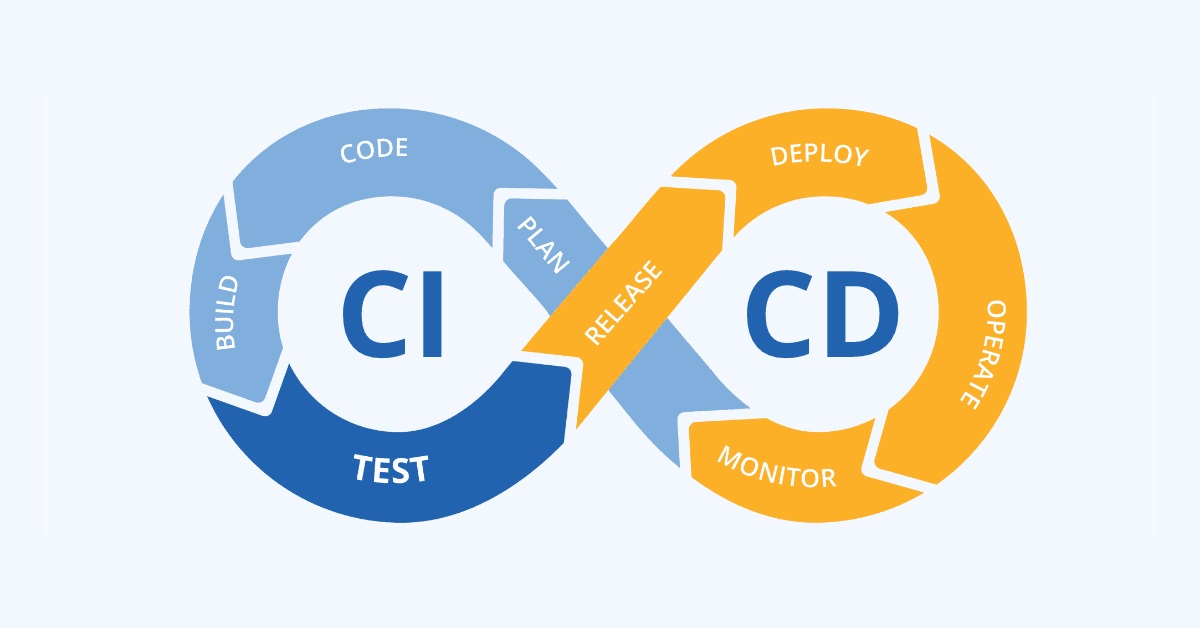
CI (Continuous Integration)
Tự động kiểm tra (test), phân tích (lint), build mỗi lần bạn push code lên GitHub.
CD (Continuous Delivery / Continuous Deployment)
-
Delivery: chuẩn bị bản build để deploy.
-
Deployment: tự động deploy lên server/hosting/PyPI.
CI/CD đảm bảo:
-
Commit nào lỗi → biết ngay
-
Không bao giờ deploy code hỏng
-
Tự động hoá toàn bộ quy trình phát hành
-
Làm việc nhóm hiệu quả hơn
-
Hạn chế thao tác thủ công dễ sai sót
GitHub Actions – cách hoạt động
GitHub Actions dùng workflow dạng YAML nằm trong folder:
Mỗi workflow là một pipeline gồm:
-
trigger (khi nào chạy: push, PR, schedule)
-
jobs (các khối công việc song song hoặc nối tiếp)
-
steps (từng bước trong job)
-
actions (task chạy sẵn như checkout code, setup Python, upload artifact)
Workflow chạy trên machine ảo:
-
ubuntu-latest
-
windows-latest
-
macos-latest
Tạo workflow CI cơ bản: Test Python bằng pytest
Tạo file:
Nội dung:
Diễn giải từng phần
-
on:
Chạy khi push hoặc tạo Pull Request vào nhánhmain. -
actions/checkout@v4
Tải mã nguồn về runner. -
actions/setup-python
Cài Python version bạn cần. -
pip install -r requirements.txt
Cài các thư viện bạn định dùng. -
pytest
Chạy test tự động.
Kết quả: mỗi lần push lên GitHub → test tự chạy → báo xanh/đỏ.
Thêm lint & formatting (black, flake8)
Cập nhật file workflow:
Giúp kiểm soát chất lượng code tự động.
Build package Python và tạo artifact
Nếu bạn có package Python (như bài trước), dùng:
Sau khi workflow chạy → bản build dist/*.whl tự động được upload để download.
Publish package lên PyPI tự động
Đầu tiên cần tạo API token từ PyPI
→ Tạo secret trong GitHub repo:
Settings → Secrets → Actions → New repository secret
-
Name:
PYPI_TOKEN -
Value: token từ PyPI
Workflow publish:
Giải thích
-
Workflow chạy khi bạn push tag:
v1.0.0,v0.2.1… -
Tự động build gói
.whlvà upload lên PyPI.
Tạo release tự động trên GitHub
Workflow:
Khi push tag → GitHub tạo release page tự động.
Triển khai Web App Python (Flask/FastAPI) lên server Linux (SSH deploy)
Dạng auto-deploy phổ biến:
-
Bạn thuê VPS / server Linux
-
Code lưu trên GitHub
-
Mỗi lần push → GitHub Actions SSH vào server và pull code mới
Workflow:
Giải thích
-
appleboy/ssh-actioncho phép chạy lệnh từ xa -
Server chạy Flask/FastAPI dùng systemd
-
Mỗi lần push: code tự cập nhật → dịch vụ tự restart
Triển khai Python Web lên Docker + GitHub Actions
Bạn có thể build Docker image trong workflow.
Diễn giải
-
GitHub Actions build image từ code mới
-
Push lên DockerHub
-
Server chỉ cần pull lại và restart container
Triển khai Python Web lên Render / Railway / Deta / HuggingFace
Dùng GitHub Actions để:
-
Trigger deploy
-
Upload artifact
-
Update environment
-
Refresh service
Ví dụ với Render:
Cron job bằng GitHub Actions (schedule)
Chạy tự động theo lịch (hàng ngày/giờ):
Dùng để:
-
Auto backup
-
Auto generate report
-
Auto crawl dữ liệu
-
Auto gửi email
Best Practices khi dùng GitHub Actions
1. Luôn dùng venv/requirements.txt hoặc poetry
Để build tái sử dụng được.
2. Dùng actions/cache để tăng tốc
Cache pip:
3. Không commit secret lên repo
Dùng GitHub Secrets.
4. Không chạy deploy trên nhánh dev
Chỉ chạy trên:
5. Tách CI và CD thành 2 workflow
CI chạy test
CD triển khai
6. Không đưa password, token vào log
Dùng *** mask hoặc GitHub secrets.
7. Dùng matrix build để test nhiều version Python
Ví dụ:
Kết bài
Deployment & CI/CD là một phần thiết yếu của bất kỳ dự án Python chuyên nghiệp nào. GitHub Actions giúp bạn:
-
Tự động hoá test
-
Build package
-
Deploy lên server/hosting
-
Publish PyPI
-
Tạo release
-
Quản lý Docker
-
Chạy workflow theo lịch
Một lập trình viên chuyên nghiệp luôn dùng CI/CD, vì nó giảm rủi ro, tăng tốc độ phát triển và đảm bảo chất lượng phần mềm.
Tiếp tục chuỗi series tự học python: (Bài 9): Lập trình hướng đối tượng

1 Trackback / Pingback